Count Your Open Applications
Right now, take a moment and count the applications you have open for development work. If you are like most developers, the list looks something like this:
- A code editor (VS Code, Cursor, or a JetBrains IDE)
- Two to four terminal windows (dev server, AI agent, git operations, miscellaneous)
- Postman or Insomnia for API testing
- DBeaver, pgAdmin, or TablePlus for database queries
- Docker Desktop for container management
- A browser with DevTools open for frontend preview
- Maybe a .env editor or a standalone JSON formatter
That is seven or more applications, each with its own window, its own keyboard shortcuts, its own update cycle, and its own subscription fee. Every alt-tab between them is a micro-interruption. Every time you copy an API response from Postman to paste into your terminal, or grab a database ID to use in an API request, you are doing manual integration work that your tools should handle for you.
The Real Cost of Tool Sprawl
The productivity cost of tool sprawl is well-documented but consistently underestimated. Research on context switching suggests that every application switch costs 20 to 30 seconds of refocusing time — not just the seconds spent alt-tabbing, but the cognitive effort of reorienting to a different interface and remembering what you were doing there.
For a developer switching between six applications 40 times per hour (a conservative estimate during active development), that is 13 to 20 minutes per hour spent on navigation rather than work. Over an eight-hour day, you lose between 1.5 and 2.5 hours to tool switching.
Then there is the financial cost. Postman’s professional plan runs $14 per month. DBeaver Pro is $11 per month. Docker Desktop requires a paid subscription for companies above a certain size. Add a paid terminal like Warp ($15/month for teams) and a cloud IDE or AI editor subscription ($20/month), and your developer tool stack costs $60 to $80 per month — $720 to $960 per year per developer.
Neither of these costs is necessary.
What Consolidation Looks Like
Tool consolidation does not mean compromising on capability. It means having the same tools you already use, built into a single application that shares context between them. Here is what that looks like in practice.
The HTTP Client: Postman Without the Context Switch
Postman is excellent software. But opening it is a context switch. You leave your development environment, navigate to a separate application, find the right collection, and construct your request. When you need to test an endpoint that your AI agent just created, you have to copy the URL and any auth tokens from your terminal into Postman manually.
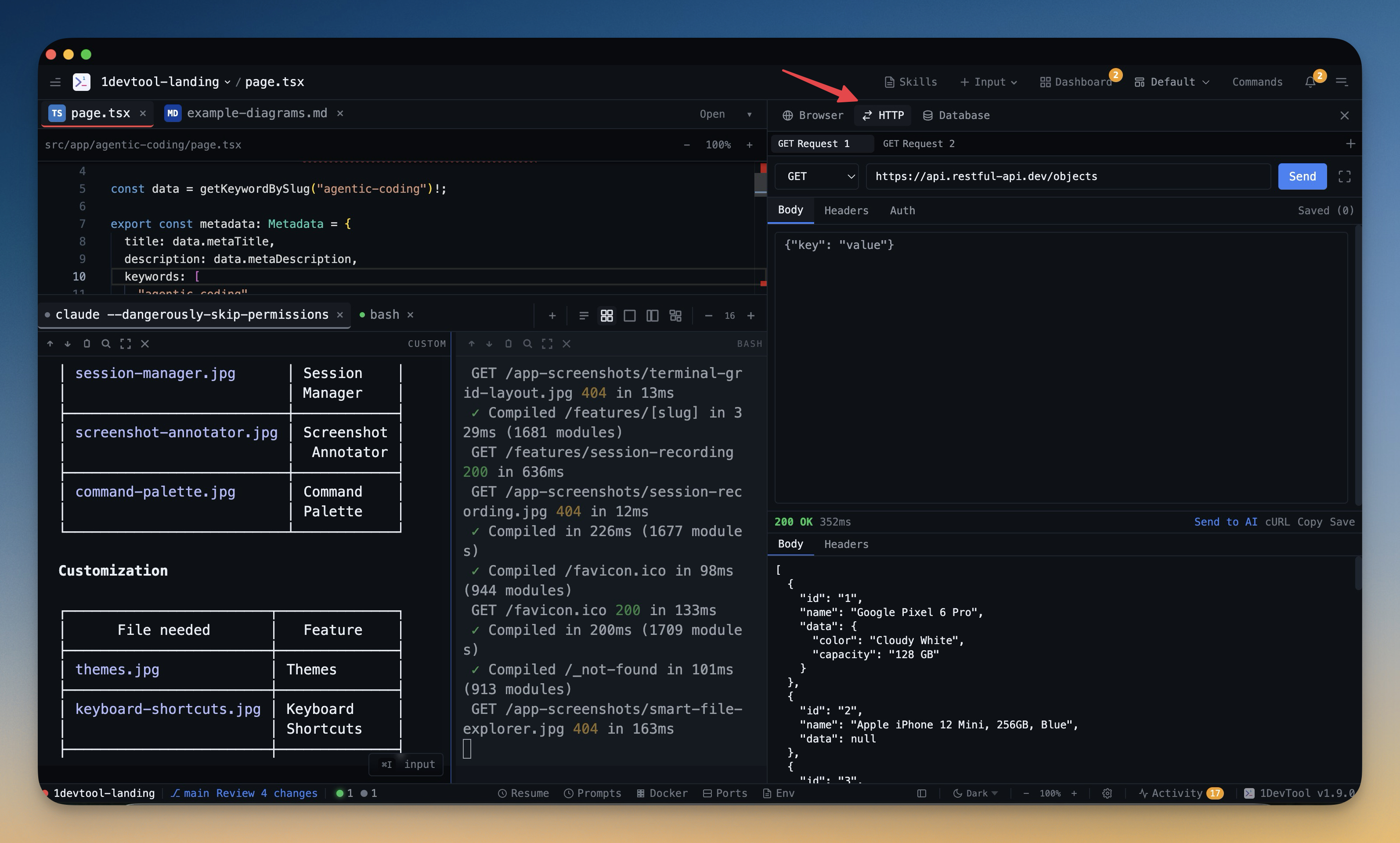
A built-in HTTP client lives right next to your terminal and code. The moment your AI agent creates a new endpoint, you can test it without switching windows. Request history is saved per project. Authentication tokens are at hand. The response inspector formats JSON, shows headers, and displays latency metrics.
1DevTool includes a full API request builder with method selection, custom headers, body editor, auth support, and multi-tab request workspaces. It saves up to 50 requests per project and lets you copy any request as cURL with one click.
The Database Client: DBeaver Without the Weight
DBeaver is a powerful tool that supports dozens of databases. It is also a heavy Java application that consumes significant memory and takes time to start up. For many developers, 80% of their database interaction is running quick queries, checking table schemas, and previewing data — tasks that do not require DBeaver’s full feature set.
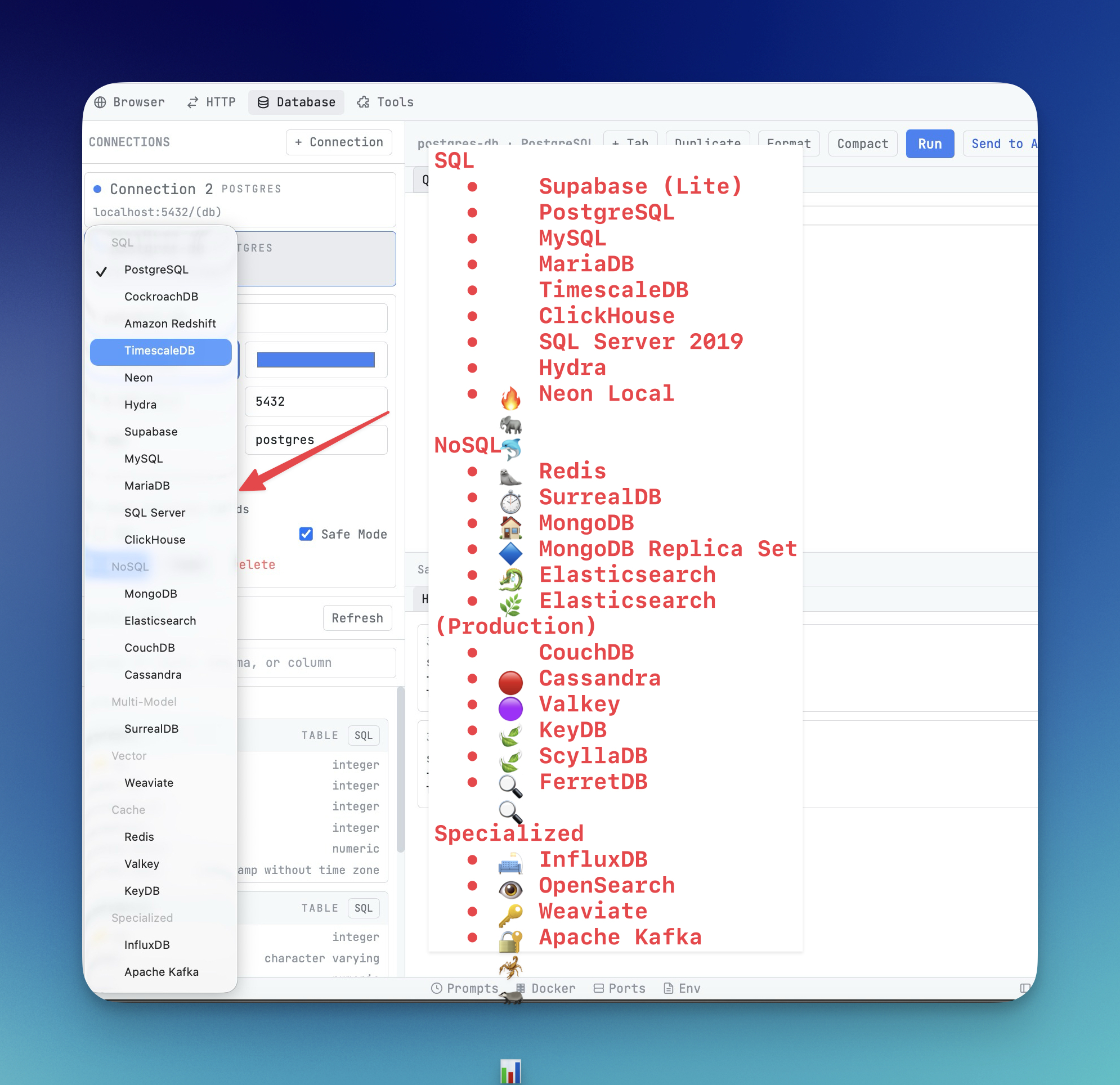
A built-in database client handles these common tasks in a lightweight interface that is always available. Connect to your database, browse schemas visually, write queries with syntax highlighting, and view results in a sortable, exportable grid.
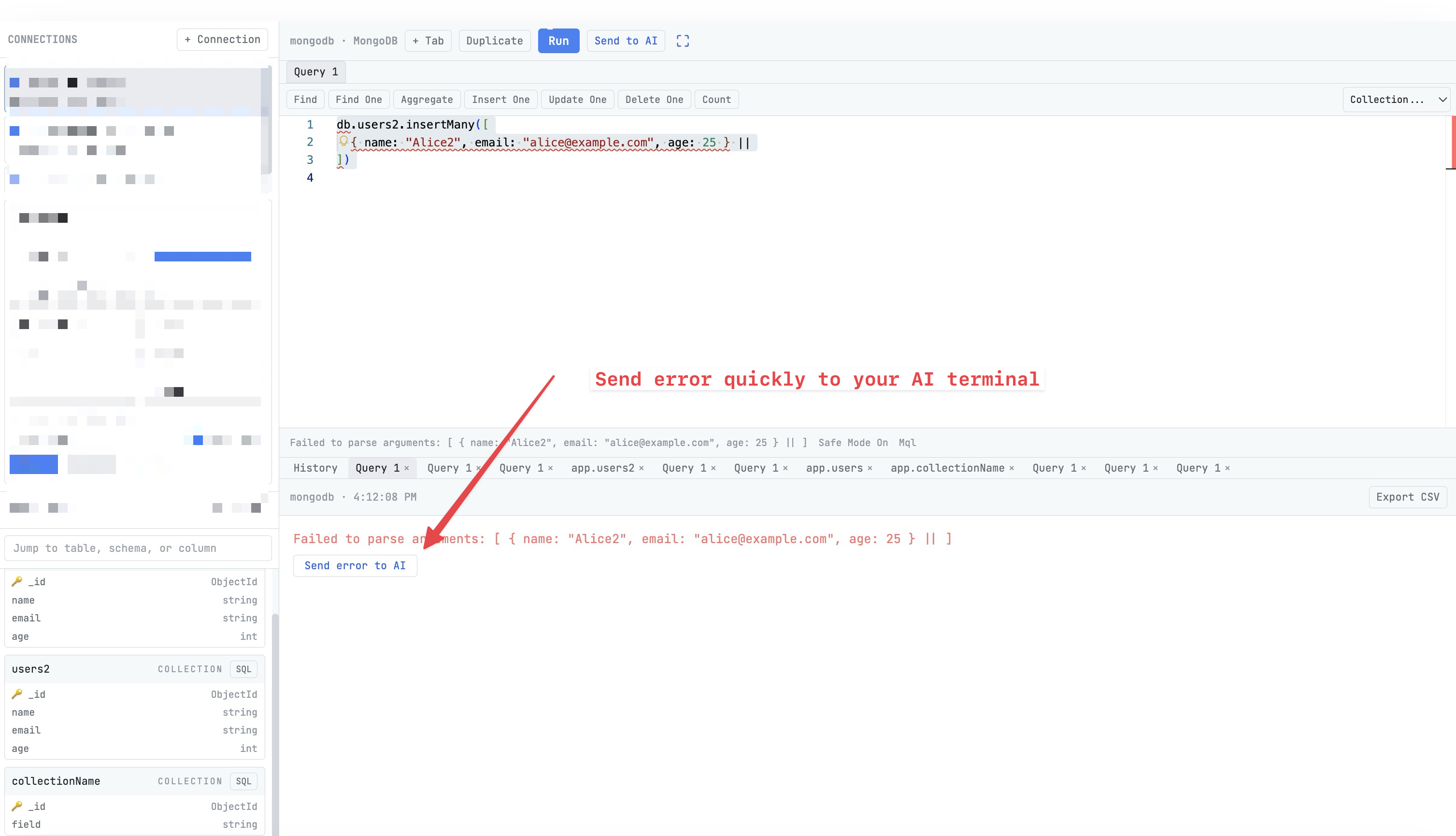
1DevTool supports 13 database engines: PostgreSQL, MySQL, MongoDB, Redis, Elasticsearch, ClickHouse, Cassandra, SurrealDB, Weaviate, InfluxDB, Kafka, CouchDB, and Microsoft SQL Server. One connection interface for all of them. Your database client starts in milliseconds, not seconds, because it is already running as part of your workspace.
The Terminal: More Than Just a Shell
Standalone terminals — whether the default system terminal, iTerm2, Hyper, or Warp — are disconnected from the rest of your development tools. You cannot send a file to your AI agent from your file explorer. You cannot route a database query result to your terminal. You cannot see your browser’s console errors alongside your agent’s output.
An integrated terminal that is aware of the rest of your workspace changes this dynamic:
- Multi-agent support. Run Claude Code, Codex CLI, Gemini CLI, and Amp in named, color-coded tabs with real-time status indicators.
- Session persistence. Terminal sessions survive application restarts. Your AI conversations, build logs, and scrollback history are preserved through tmux integration.
- Terminal dashboard. A Kanban-style board showing the status of every terminal across every project — Idle, Running, or Needs Review.
- Send context to agents. Select files from your file explorer, toggle on browser console logs and network activity, attach screenshots, and send it all to an AI agent terminal in one action.
Docker Management: Desktop Without Docker Desktop
Docker Desktop has become increasingly restrictive with its licensing requirements while offering capabilities most developers use a fraction of. The core actions — starting and stopping containers, viewing logs, inspecting resource usage, and cleaning up unused images — do not require a full standalone application.
1DevTool includes container management with status indicators, one-click start/stop/restart, real-time CPU and memory gauges, live log streaming, environment variable inspection, and image and volume management with cleanup tools. If Docker Desktop feels like using a sledgehammer to hang a picture frame, this is the right-sized hammer.
Browser Preview: No More Alt-Tab to Chrome
Frontend developers alt-tab to Chrome hundreds of times per day. Open DevTools. Check the console. Look at network requests. Inspect an element. Then alt-tab back to the editor or terminal to make changes. Then alt-tab back to Chrome to see the result.
An embedded browser with DevTools access collapses this cycle. Your dev server preview sits right next to your terminal and code. Network inspection, console debugging, and element inspection happen without leaving the workspace. The feedback loop tightens from seconds to near-instant.
The Developer Toolbox Bonus
Beyond the major tools, developers regularly need small utilities: a JSON formatter for cleaning up API responses, a JWT decoder for debugging authentication, a regex tester for validating patterns, a diff viewer for comparing configurations, a Base64 encoder, a UUID generator, a timestamp converter.
Each of these tasks typically means opening a browser tab and finding a web-based tool. Each web tool is a potential security concern — you are pasting potentially sensitive data into someone else’s website.
1DevTool includes all of these as local utilities. JSON formatting, JWT decoding, regex testing, diff viewing, Base64 encoding, URL encoding, hash generation, UUID generation, timestamp conversion, and string case conversion — all running locally, with no data leaving your machine.
What You Give Up (and What You Do Not)
Consolidation involves tradeoffs, and honesty about them matters.
You give up deep specialization in some areas. DBeaver’s advanced features — ER diagrams, data transfer tools, support for obscure databases — go beyond what a built-in database client provides. Postman’s team collaboration features, mock servers, and automated testing pipelines are more extensive than a built-in HTTP client.
You do not give up the ability to use specialized tools when needed. 1DevTool complements your existing tools rather than demanding you abandon them. For the 80% of daily database and API work that is straightforward, the built-in tools handle it. For the 20% that requires DBeaver’s ER diagrams or Postman’s team collections, those applications are still available.
You gain unified context. This is the advantage no collection of standalone tools can replicate. When your terminal, API client, database, browser, and file system all share a workspace, information flows naturally between them instead of being manually copied.
The Math
Here is the financial case in plain terms:
| Tool | Monthly Cost | Annual Cost |
|---|---|---|
| Postman Pro | $14 | $168 |
| DBeaver Pro | $11 | $132 |
| Docker Desktop (commercial) | $9+ | $108+ |
| AI editor subscription | $20 | $240 |
| Total | $54+/mo | $648+/yr |
1DevTool costs $29 once. It replaces the API client, database client, and terminal while adding AI agent orchestration, browser preview, Docker management, and developer utilities. The breakeven point is approximately two weeks.
Getting Started
1DevTool is available for macOS, Windows, and Linux. Download the trial, set up your first project, and start replacing the applications you currently juggle. Point the HTTP client at your API, connect the database client to your data stores, and launch your AI agents in the multi-agent terminal.
Most developers report that the consolidation benefit becomes obvious within the first day. By the end of the first week, opening Postman or DBeaver as standalone applications feels like an unnecessary detour.
Your tools should work together. When they live in the same workspace, they do.